What a Paid WordPress Toolkit Actually Costs You Every Year (Not Just Once)
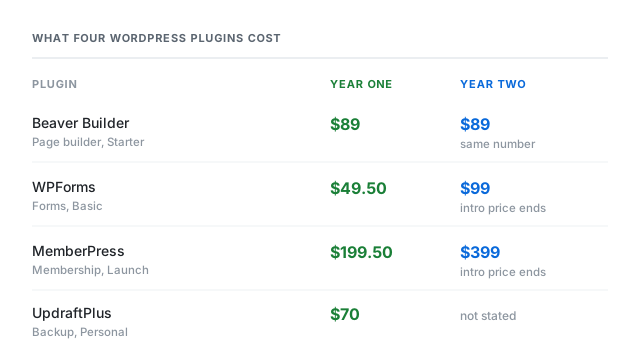
Four plugins, four checkout prices. Two of the four return to full price in year two, one renews at the same number, and one does not say. We read each company's own pages to find out which is which.
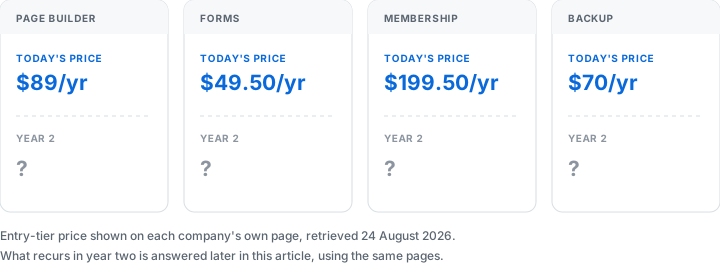
If you run WordPress yourself, you've probably paid for at least one plugin already. A page builder, a form tool, a membership gate, a backup service. Each one shows a price on its pricing page, and that price is the number you remember.
What that number often doesn't tell you is what happens the second year. Some of these companies discount the first year and quietly return to a higher number after that. Others don't discount at all, so the sticker price is what recurs. The difference only shows up if you read past the checkout page.
Older WordPress plugins were often sold as a one-time license: pay once, use the code forever, maybe pay again for a major version upgrade if you wanted one. The four products below don't work that way. Each one bills annually, and each one expects you to keep paying every year the plugin stays active on your site.
That shift changes what "cheap" means. A plugin that costs less than a coffee subscription in year one can cost more than a streaming bundle by year three, depending on how the company structures its renewal. Reading the renewal wording matters as much as reading the sticker price.
This article looks at four plugin categories that a solo WordPress operator commonly pays for, and reads what each company itself publishes about what you pay after year one.
What We Read, and What We Haven't Tried
We read the pricing pages and terms pages for Beaver Builder, WPForms, MemberPress, and UpdraftPlus, all retrieved on 2026-08-24. Every price and every renewal note below traces back to one of those pages.
We have not installed any of these four plugins on a live site. We haven't built a page, built a form, gated a course, or restored a backup with any of them. Where a claim would require actually running the product, we've left it out.
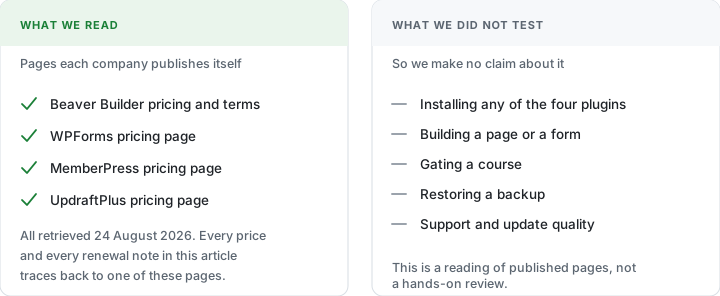
If a company's page doesn't state a number, we say "not stated" rather than estimate one. That applies more than once below, particularly to UpdraftPlus.
We also limited this comparison to four categories rather than covering every popular WordPress plugin. Several well-known page builders, form tools, and SEO plugins publish terms that restrict how their own pricing pages can be read and quoted by outside sites, and we're not including products where that's the case. That's a narrower list than a full market roundup, but everything in it is something we could actually read and cite directly.
Three Questions Before You Trust a First-Year Price
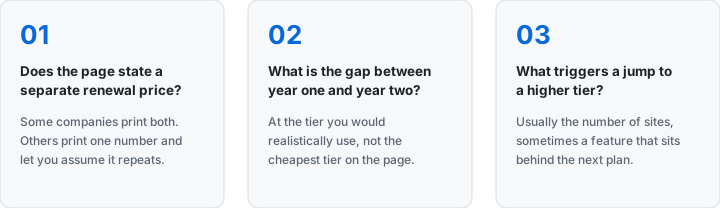
A first-year price alone doesn't tell you what a tool costs to keep running. Three questions get closer to the real number.
- Does the page state a separate renewal price, or only a first-year price? Some companies print both. Others print one number and let you assume it repeats.
- What is the actual dollar gap between year one and year two, at the tier you'd realistically use? Not the cheapest tier on the page, the one that fits your site count.
- What triggers a jump to a higher tier? Usually site count, sometimes a feature gate. Worth knowing before you're mid-project and find out the hard way.
For a solo operator or a small team, the second question is usually the one that matters most. A tool that looks cheap on day one can cost twice as much by the second renewal, and nothing on the checkout page tells you that in advance.
Why the Second-Year Number Is Easy to Miss
The first number a checkout page shows you is the one you remember. If a renewal note exists at all, it's usually a separate sentence elsewhere on the same page, not the headline figure next to the buy button.
Checking back before a subscription renews takes a deliberate step: reopening the pricing page, or reading the receipt closely, sometime well after the purchase was made. Most people don't do that until the higher charge already shows up on a card statement.
None of that means a company is doing anything wrong by pricing this way. Introductory pricing followed by a standard renewal rate is common across subscription software generally, not specific to WordPress plugins. It just means the number worth budgeting around is the one that recurs, not the one on the button.
Comparison at a Glance
The table below uses the lowest paid tier each company lists, plus whatever renewal information appears on the same page. Site-count limits differ by product, so the tiers aren't a perfect match, but the entry price is what most solo users would actually pay first.
| Product | Category | Entry-tier price | What the page says about renewal | Retrieved |
|---|---|---|---|---|
| Beaver Builder | Page builder | $89/yr (Starter, 1 site) | "Renew automatically once a year at the standard annual price" | 2026-08-24 |
| WPForms | Forms | $49.50/yr (Basic), normally $99 | "Special introductory pricing, all renewals are at full price" | 2026-08-24 |
| MemberPress | Membership | $199.50/yr (Launch), normally $399 | "Special introductory pricing, all annual renewals are at full price" | 2026-08-24 |
| UpdraftPlus | Backup | $70/yr (Personal, 2 sites) | No separate renewal number stated on the pricing page | 2026-08-24 |
Sources: wpbeaverbuilder.com/pricing/ (retrieved 2026-08-24); wpforms.com/pricing/ (retrieved 2026-08-24); memberpress.com/pricing/ (retrieved 2026-08-24); teamupdraft.com/updraftplus/pricing/ (retrieved 2026-08-24).
Two of the four companies print the second-year number right on the pricing page. Two don't. That gap alone is worth noticing before comparing anything else.
The Discount Pattern, Tier by Tier
The entry tier only tells part of the story. Each company applies the same renewal pattern across every tier it sells, not just the cheapest one, so the table below lists all of them.
| Product | Tier | Year-one price | Year-two price, as stated |
|---|---|---|---|
| Beaver Builder | Starter | $89/yr | $89/yr (standard annual price) |
| Beaver Builder | Plus | $179/yr | $179/yr (standard annual price) |
| Beaver Builder | Professional | $299/yr | $299/yr (standard annual price) |
| Beaver Builder | Unlimited | $546/yr | $546/yr (standard annual price) |
| WPForms | Basic | $49.50/yr | $99/yr |
| WPForms | Plus | $99.50/yr | $199/yr |
| WPForms | Pro | $199.50/yr | $399/yr |
| WPForms | Elite | $299.50/yr | $599/yr |
| MemberPress | Launch | $199.50/yr | $399/yr |
| MemberPress | Growth | $349.50/yr | $699/yr |
| MemberPress | Scale | $499.50/yr | $999/yr |
| UpdraftPlus | Personal | $70/yr | not stated on the pricing page |
| UpdraftPlus | Business | $95/yr | not stated on the pricing page |
| UpdraftPlus | Agency | $145/yr | not stated on the pricing page |
| UpdraftPlus | Enterprise | $195/yr | not stated on the pricing page |
| UpdraftPlus | Gold | $399/yr | not stated on the pricing page |
Two patterns hold across every tier of the same product, not just the cheapest one. Every WPForms and MemberPress tier roughly doubles at renewal. Every Beaver Builder tier is described as renewing at the same number it started at.
UpdraftPlus sits in between those two patterns without matching either one exactly. Its page doesn't promise a flat renewal the way Beaver Builder's does, and it doesn't disclose a doubling the way WPForms and MemberPress do. It simply doesn't say, which is its own kind of answer.
Beaver Builder: Page Builder
Beaver Builder's four tiers, all annual only with no monthly option, run from $89/yr for one site up to $546/yr for unlimited sites. The Starter tier caps at one site, Plus at three, Professional at fifty.
What stands out. The pricing page states plainly that current subscriptions "renew automatically once a year at the standard annual price." There's no separate introductory number printed anywhere on the page. What you pay at signup is presented as what recurs.
Where it's less clear. A FAQ note on the same page mentions some existing customers hold a "legacy license with grandfathered renewal pricing," which implies renewal terms have changed for at least some past customers at some point. Whether that could happen again is not something the company states either way, so we're marking future renewal price stability as unverified.
Who this fits. Someone building on one to three sites, where $89 to $179 a year is a predictable, unsurprising number to plan around.
There's no monthly billing option listed on the page either, so the choice is annual or nothing. That removes one comparison a shopper might otherwise want to make, weighing a monthly rate against the yearly one, and it means the full year's cost is due upfront regardless of which tier you pick.
WPForms: Forms
WPForms lists four tiers between $49.50/yr and $299.50/yr. Each price is labeled as introductory, with a "normally" price listed directly beside it: Basic normally $99, Plus normally $199, Pro normally $399, Elite normally $599.
What stands out. The page is direct about the discount structure. It states outright that "all renewals are at full price," which means the number a new customer sees at checkout is roughly half of what the second-year bill will be.
Where it's less clear. The page doesn't say whether the introductory rate can be renewed again through a separate promotion, a common pattern with subscription software. We haven't found that stated either way, so we're not assuming it either way.
Who this fits. Someone who wants the lowest possible number to start, and is comfortable budgeting for a bill that roughly doubles the second year, at whichever tier they picked.
MemberPress: Membership
MemberPress runs three tiers, from $199.50/yr for Launch up to $499.50/yr for Scale, each listed beside a "normally" price of $399, $699, and $999.
What stands out. Same pattern as WPForms: the page states "special introductory pricing, all annual renewals are at full price." The gap between first-year and second-year cost is close to two times at every tier.
Where it's less clear. MemberPress's pricing page didn't include the excluded-items or refund detail we'd want to confirm the full terms of that renewal, since that lives on a separate page we haven't pulled in for this comparison. The core renewal-price statement itself is direct enough to quote as is.
Who this fits. Someone gating a course or a membership area who has budgeted for the full $399-to-$999 range from the start, rather than anchoring on the smaller first-year number.
UpdraftPlus: Backup
UpdraftPlus's five tiers run from $70/yr for two sites up to $399/yr for unlimited sites with the Gold tier, priced by site count rather than by feature depth.
What stands out. The pricing page states that subscriptions "renew automatically," and separately that a purchase includes twelve months of updates "which will continue if you renew." Neither sentence names a different number for the second year.
Where it's less clear. Unlike WPForms and MemberPress, there's no "normally $X" label next to any UpdraftPlus price, and unlike Beaver Builder, there's also no sentence stating the renewal is at "the standard price." The listed price is what appears to recur, based on the absence of any discount language, but the page doesn't confirm that in as many words. We're marking this as unverified rather than assuming it behaves like Beaver Builder's stated flat renewal.
Who this fits. Someone who wants a number that's unlikely to double later, while accepting that the company's own page doesn't spell out that guarantee.
Site count is the lever named on the pricing page itself: Personal covers two sites, Business ten, Agency thirty-five, Enterprise and Gold unlimited. We didn't compare the feature lists behind each tier in detail, so we're not claiming they're identical, only that site count is the difference the pricing page leads with.
Best Fit by How You Actually Use WordPress
- One site, testing the water. Beaver Builder Starter ($89/yr) or UpdraftPlus Personal ($70/yr) both sit under $100/yr with no stated first-year discount to lose track of.
- A handful of client or personal sites. Beaver Builder Plus ($179/yr, 3 sites) or UpdraftPlus Business ($95/yr, 10 sites) scale by site count rather than by feature tier.
- Selling access to content. MemberPress is the only membership-gating product here; budget for the full $399+ renewal, not the $199.50 introductory number.
- Collecting leads or applications. WPForms's Basic tier covers simple forms; budget for $99/yr from the second renewal onward, not the $49.50 first-year price.
None of these four is a universal answer. Which one fits depends more on whether you're paying for a feature you'll use once or a feature you'll renew for years, than on which company's homepage looks the most polished.
Questions Worth Asking Before You Buy Any of These
- Does the checkout price match the price on the plan comparison table, or is there a separate "renews at" number printed somewhere else on the page?
- If the page uses the word "normally" or "standard," which of the two numbers next to it is what you'll actually pay next year?
- Does the tier you need cover your site count today, or will next year's growth push you into a higher tier regardless of the renewal question?
- Is there a stated refund or cancellation window, and did you check it before your card was charged rather than after?
None of these have a single right answer across all four products. That's why the individual sections above quote each company's own wording rather than summarizing it into one shared rule.
Getting Started
None of these four plugins requires a long research project before you can try it. Each company's own pricing page is the fastest way to confirm the current numbers, since prices and promotions can change after this article was written.
A reasonable next step is picking the one category that matches an actual gap in how your site runs today, reading that one company's terms and refund policy directly, and budgeting for the second-year price from the start rather than the first-year one.
That last step is the one this article keeps returning to. Whichever of these four you're weighing, the number worth writing down isn't the one on the pricing button. It's the one the page says you'll pay the next time it renews, if the page says so at all.
Sources referenced in this article: Beaver Builder pricing page, https://www.wpbeaverbuilder.com/pricing/ (retrieved 2026-08-24); WPForms pricing page, https://wpforms.com/pricing/ (retrieved 2026-08-24); MemberPress pricing page, https://memberpress.com/pricing/ (retrieved 2026-08-24); UpdraftPlus pricing page, https://teamupdraft.com/updraftplus/pricing/ (retrieved 2026-08-24).
Sources
| Page | Publisher | Retrieved |
|---|---|---|
| Pricing page | Beaver Builder (wpbeaverbuilder.com) | 24 Aug 2026 |
| Terms and conditions | Beaver Builder (wpbeaverbuilder.com) | 24 Aug 2026 |
| Pricing page | WPForms (wpforms.com) | 24 Aug 2026 |
| Pricing page | MemberPress (memberpress.com) | 24 Aug 2026 |
| Pricing page | UpdraftPlus (teamupdraft.com) | 24 Aug 2026 |
We earn nothing from this article. Nobody paid us to write it, nobody outside this site reviewed it before publication, and we hold no partnership with any company named in it.